> ## Documentation Index
> Fetch the complete documentation index at: https://docs.inceptia.ai/llms.txt
> Use this file to discover all available pages before exploring further.
# Campaigns
> Follow a campaign's progress, understand its metrics and act on it
A **campaign** is a batch: a file of cases that the bot will work through, within a schedule and with a given configuration. This screen is where you follow that batch while it happens.
## Where to find them
There are two ways to reach a campaign, depending on what you need:
* **Campaign monitoring** shows the campaigns of all your bots in a single table. It's the view to use when you want to know how the day is going.
* **Bots → a bot → Campaigns** shows only that bot's campaigns.
Both tables carry the same information, and from either one you can open a campaign's detail.
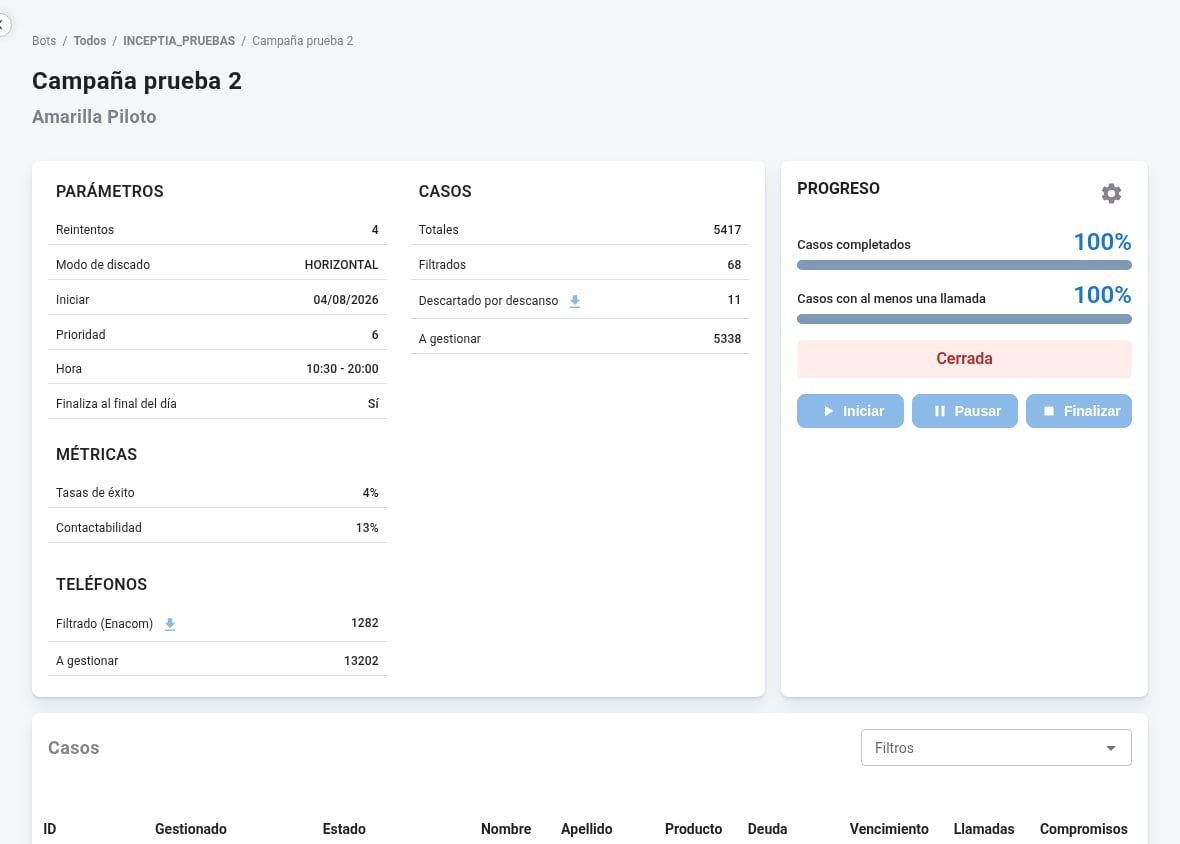 A campaign's detail brings together, at the top, the parameters it was created with and the figures on how it's going; below, the list of its cases.
The table doesn't update on its own in real time: it refreshes every 60 seconds, and you can also force it with the refresh button.
***
## Campaign statuses
| Status | What it means |
| ------------- | --------------------------------------------------------------- |
| **Scheduled** | Created, with a start date in the future. It hasn't dialed yet. |
| **Ongoing** | It's working through cases within its schedule. |
| **Paused** | It stopped generating new calls. It can be resumed. |
| **Closed** | It finished. It can't be reopened. |
### Start, pause and finish
From each campaign's actions menu you can change its status without opening the detail:
| Action | Available when it's… | What it does |
| ---------- | ---------------------------- | ---------------------------------- |
| **Start** | Paused or Scheduled | Puts it into Ongoing. |
| **Pause** | Ongoing | Stops the generation of new calls. |
| **Finish** | Ongoing, Paused or Scheduled | Closes the campaign for good. |
**Pausing and finishing don't cancel calls that are already in progress or queued.** They stop new calls from being generated, so you'll still see activity for a few minutes after pausing.
A closed campaign **can't be reopened**. If you need to resume the batch, you have to create a new campaign with the remaining cases.
A campaign also closes on its own, without anyone finishing it, when it reaches 100% completion. If you see a Closed campaign that nobody closed, this is why.
***
## A campaign's metrics
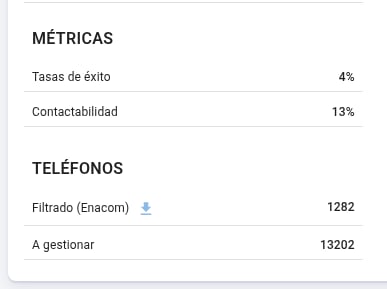
The detail groups its figures into two blocks: **Metrics**, with contactability and success rate, and **Progress**, with the two progress bars.
A campaign's detail brings together, at the top, the parameters it was created with and the figures on how it's going; below, the list of its cases.
The table doesn't update on its own in real time: it refreshes every 60 seconds, and you can also force it with the refresh button.
***
## Campaign statuses
| Status | What it means |
| ------------- | --------------------------------------------------------------- |
| **Scheduled** | Created, with a start date in the future. It hasn't dialed yet. |
| **Ongoing** | It's working through cases within its schedule. |
| **Paused** | It stopped generating new calls. It can be resumed. |
| **Closed** | It finished. It can't be reopened. |
### Start, pause and finish
From each campaign's actions menu you can change its status without opening the detail:
| Action | Available when it's… | What it does |
| ---------- | ---------------------------- | ---------------------------------- |
| **Start** | Paused or Scheduled | Puts it into Ongoing. |
| **Pause** | Ongoing | Stops the generation of new calls. |
| **Finish** | Ongoing, Paused or Scheduled | Closes the campaign for good. |
**Pausing and finishing don't cancel calls that are already in progress or queued.** They stop new calls from being generated, so you'll still see activity for a few minutes after pausing.
A closed campaign **can't be reopened**. If you need to resume the batch, you have to create a new campaign with the remaining cases.
A campaign also closes on its own, without anyone finishing it, when it reaches 100% completion. If you see a Closed campaign that nobody closed, this is why.
***
## A campaign's metrics
The detail groups its figures into two blocks: **Metrics**, with contactability and success rate, and **Progress**, with the two progress bars.
 ### Contactability
The percentage of the campaign's cases the bot **managed to talk to**. A case counts toward contactability when there was a conversation; a phone that rang with nobody picking up doesn't.
On ongoing campaigns the value updates continuously, with up to a minute of delay. On closed campaigns the final value stays fixed.
### Success rate
The percentage of the campaign's cases that ended in a **payment promise**. It's the business-outcome metric: it doesn't measure how many calls went well, but how many cases committed to pay.
Contactability and success rate answer different questions and aren't comparable to each other: one measures reach — how many you talked to — and the other, outcome. It's normal for one to be high and the other low.
### The two progress bars
Under **Progress** there are two bars measuring two different things about the same batch:
| Bar | What it measures |
| -------------------------------- | ---------------------------------------------------------- |
| **Cases with at least one call** | Cases that already received at least one contact attempt. |
| **Completed cases** | Cases whose handling is over and won't be attempted again. |
### Contactability
The percentage of the campaign's cases the bot **managed to talk to**. A case counts toward contactability when there was a conversation; a phone that rang with nobody picking up doesn't.
On ongoing campaigns the value updates continuously, with up to a minute of delay. On closed campaigns the final value stays fixed.
### Success rate
The percentage of the campaign's cases that ended in a **payment promise**. It's the business-outcome metric: it doesn't measure how many calls went well, but how many cases committed to pay.
Contactability and success rate answer different questions and aren't comparable to each other: one measures reach — how many you talked to — and the other, outcome. It's normal for one to be high and the other low.
### The two progress bars
Under **Progress** there are two bars measuring two different things about the same batch:
| Bar | What it measures |
| -------------------------------- | ---------------------------------------------------------- |
| **Cases with at least one call** | Cases that already received at least one contact attempt. |
| **Completed cases** | Cases whose handling is over and won't be attempted again. |
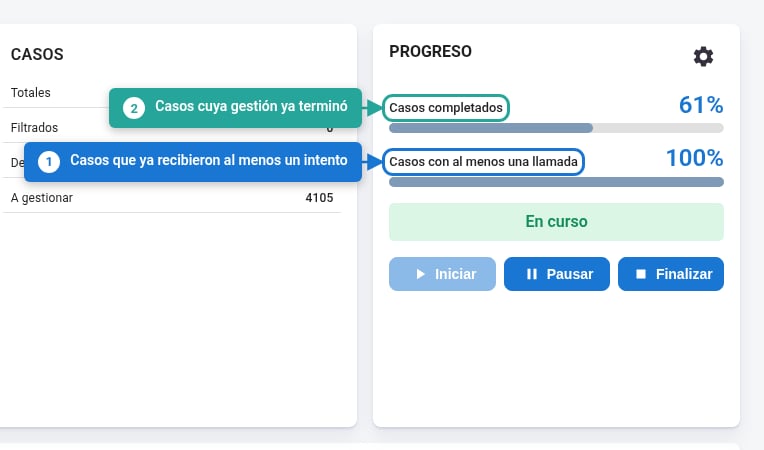 A case enters the first bar as soon as it's called for the first time. It only enters the second one when its handling is over: because it produced a final result, because it ran out of retries, or because it went into rest.
That's why **the calls bar is always equal to or ahead of** the completed one, and the distance between them is the number of cases being handled right now: they've been attempted, but can still receive another call.
As the campaign advances, that gap opens and then closes: first everyone gets dialed, and only afterwards do they start closing. **When the campaign finishes handling everything, both bars read 100% and match** — that's the sign that nothing is pending.
If the calls bar hits 100% and the completed one lags behind for a while, that's expected: there are no cases left to attempt, but some still allow another retry before closing.
***
## A campaign's parameters
A case enters the first bar as soon as it's called for the first time. It only enters the second one when its handling is over: because it produced a final result, because it ran out of retries, or because it went into rest.
That's why **the calls bar is always equal to or ahead of** the completed one, and the distance between them is the number of cases being handled right now: they've been attempted, but can still receive another call.
As the campaign advances, that gap opens and then closes: first everyone gets dialed, and only afterwards do they start closing. **When the campaign finishes handling everything, both bars read 100% and match** — that's the sign that nothing is pending.
If the calls bar hits 100% and the completed one lags behind for a while, that's expected: there are no cases left to attempt, but some still allow another retry before closing.
***
## A campaign's parameters
 ### Retries
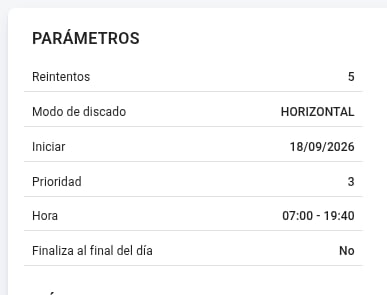
**What it is:** how many times each phone number is called before it's considered exhausted.
The limit is **per phone number, not per case**. With retries set to `4`, each of the case's numbers can receive up to four calls — not the case as a whole. How many numbers are in play is set by [Priority](#dial-mode-and-priority).
### Dial mode and Priority
These two go together: the mode defines **how** the campaign goes through each case's phone numbers, and priority defines **which ones**.
Each case can bring several phone numbers. The order isn't arbitrary: they're the columns you defined in the [campaign input file](/en/construccion/archivo-entrada-campana), and that order is the priority order — the first one is the main number.
The campaign goes through **several numbers per case**. Priority says up to which one: with `3`, it uses the first three and leaves the rest out.
The campaign works on **a single number**. Priority says which one: with `2`, it only calls each case's second phone number.
In horizontal mode, the bot doesn't call the numbers simultaneously or alternate between them: it insists on the first one until its retries run out, only then moves to the second, and so on. The case is considered exhausted when every enabled number has reached its limit.
In horizontal mode, priority and retries multiply. With **priority 3** and **retries 4**, a case can receive up to **12 calls**: four for each of the three numbers. Before raising either value, it's worth looking at the other.
Priority is not a priority of one campaign over another: it doesn't define which one is handled first if you have several running, but which of each case's phone numbers come into play.
Vertical is useful for surgical batches on a specific number — for example, a second pass calling only the work phone. Horizontal is the usual choice when you want to exhaust each case's contact options.
### Start and schedule
The **start** date defines when it begins, and the **schedule** between which hours of the day it can call, in the bot's time zone.
***
## The campaign's cases
The **Cases** block reports what happened with the file's cases:
| | |
| ------------------------- | ------------------------------------------------------------------------------------------------------------------------------------- |
| **Total** | Cases that came in from the file. |
| **Filtered** | Cases discarded while processing the file, for not meeting the validations you configured. |
| **Discarded due to rest** | Cases that weren't handled because they had an active rest from a previous campaign. See [Rest rules](/en/operacion/reglas-descanso). |
| **To handle** | The ones actually in play: total minus filtered minus discarded due to rest. |
If a campaign called far fewer cases than you uploaded, the explanation is here: the difference goes into filtered and discarded due to rest.
The download icon next to **Discarded due to rest** gives you the list of those cases, one row each: the identifier, its phone numbers, the debt codes, the **reason for the rest** —the label that caused it— and the **activation date**, that is, from when it's available to be handled again.
That file answers the question case by case: why this contact wasn't called, and when it can be called.
## The campaign's phone numbers
The **Phone numbers** block does the same one level down, since a case can bring several numbers:
| | |
| --------------------- | ------------------------------------------------------------------------------------------------------------------------------------------------------------------------------------------------------ |
| **Filtered (Enacom)** | Numbers discarded by the regulator's filter. They're checked against the official numbering assignment registry, so numbers that don't exist or whose range isn't assigned to any carrier are dropped. |
| **To handle** | The numbers left available to call. |
The download icon next to the filtered ones lets you download the list of discarded numbers, to check them against your source database.
This filter only applies where there's a regulator with a public registry — in Argentina, Enacom. It avoids spending attempts on numbers that were never going to answer.
***
## From the API
All these figures are available without entering the platform, in [Campaign detail](/en/api-reference/campaigns/detail). You can also [change a campaign's status](/en/api-reference/campaigns/status) — start, pause or finish it — from your own system.
### Retries
**What it is:** how many times each phone number is called before it's considered exhausted.
The limit is **per phone number, not per case**. With retries set to `4`, each of the case's numbers can receive up to four calls — not the case as a whole. How many numbers are in play is set by [Priority](#dial-mode-and-priority).
### Dial mode and Priority
These two go together: the mode defines **how** the campaign goes through each case's phone numbers, and priority defines **which ones**.
Each case can bring several phone numbers. The order isn't arbitrary: they're the columns you defined in the [campaign input file](/en/construccion/archivo-entrada-campana), and that order is the priority order — the first one is the main number.
The campaign goes through **several numbers per case**. Priority says up to which one: with `3`, it uses the first three and leaves the rest out.
The campaign works on **a single number**. Priority says which one: with `2`, it only calls each case's second phone number.
In horizontal mode, the bot doesn't call the numbers simultaneously or alternate between them: it insists on the first one until its retries run out, only then moves to the second, and so on. The case is considered exhausted when every enabled number has reached its limit.
In horizontal mode, priority and retries multiply. With **priority 3** and **retries 4**, a case can receive up to **12 calls**: four for each of the three numbers. Before raising either value, it's worth looking at the other.
Priority is not a priority of one campaign over another: it doesn't define which one is handled first if you have several running, but which of each case's phone numbers come into play.
Vertical is useful for surgical batches on a specific number — for example, a second pass calling only the work phone. Horizontal is the usual choice when you want to exhaust each case's contact options.
### Start and schedule
The **start** date defines when it begins, and the **schedule** between which hours of the day it can call, in the bot's time zone.
***
## The campaign's cases
The **Cases** block reports what happened with the file's cases:
| | |
| ------------------------- | ------------------------------------------------------------------------------------------------------------------------------------- |
| **Total** | Cases that came in from the file. |
| **Filtered** | Cases discarded while processing the file, for not meeting the validations you configured. |
| **Discarded due to rest** | Cases that weren't handled because they had an active rest from a previous campaign. See [Rest rules](/en/operacion/reglas-descanso). |
| **To handle** | The ones actually in play: total minus filtered minus discarded due to rest. |
If a campaign called far fewer cases than you uploaded, the explanation is here: the difference goes into filtered and discarded due to rest.
The download icon next to **Discarded due to rest** gives you the list of those cases, one row each: the identifier, its phone numbers, the debt codes, the **reason for the rest** —the label that caused it— and the **activation date**, that is, from when it's available to be handled again.
That file answers the question case by case: why this contact wasn't called, and when it can be called.
## The campaign's phone numbers
The **Phone numbers** block does the same one level down, since a case can bring several numbers:
| | |
| --------------------- | ------------------------------------------------------------------------------------------------------------------------------------------------------------------------------------------------------ |
| **Filtered (Enacom)** | Numbers discarded by the regulator's filter. They're checked against the official numbering assignment registry, so numbers that don't exist or whose range isn't assigned to any carrier are dropped. |
| **To handle** | The numbers left available to call. |
The download icon next to the filtered ones lets you download the list of discarded numbers, to check them against your source database.
This filter only applies where there's a regulator with a public registry — in Argentina, Enacom. It avoids spending attempts on numbers that were never going to answer.
***
## From the API
All these figures are available without entering the platform, in [Campaign detail](/en/api-reference/campaigns/detail). You can also [change a campaign's status](/en/api-reference/campaigns/status) — start, pause or finish it — from your own system.