> ## Documentation Index
> Fetch the complete documentation index at: https://docs.inceptia.ai/llms.txt
> Use this file to discover all available pages before exploring further.
# Rest rules
> How long a case stays without being contacted again, based on how the call ended
## What rest rules are
When a call ends, the bot classifies it with a [label](/en/construccion/etiquetas): the outcome it closed with — "Busy", "Doesn't want to be contacted", "Promised a date", etc.
For some of those outcomes it doesn't make sense to call again right away. If the contact already said they don't want to be called, insisting the next day adds nothing. A **rest rule** defines, for a label, how long the case stays out of campaigns before it can be contacted again.
While a case is resting, the bot won't call it even if it comes in a new campaign's file.
What you can do here depends on your permissions: with read permission you can see how each label is configured; with edit permission you can also create, modify and delete rules. If you need edit permission, talk to your Inceptia representative.
***
## Where to see them
From **Operations → Bots**, open the bot you want to review and choose **Rest rules** in the side menu, next to Campaigns, Trends and Exports.
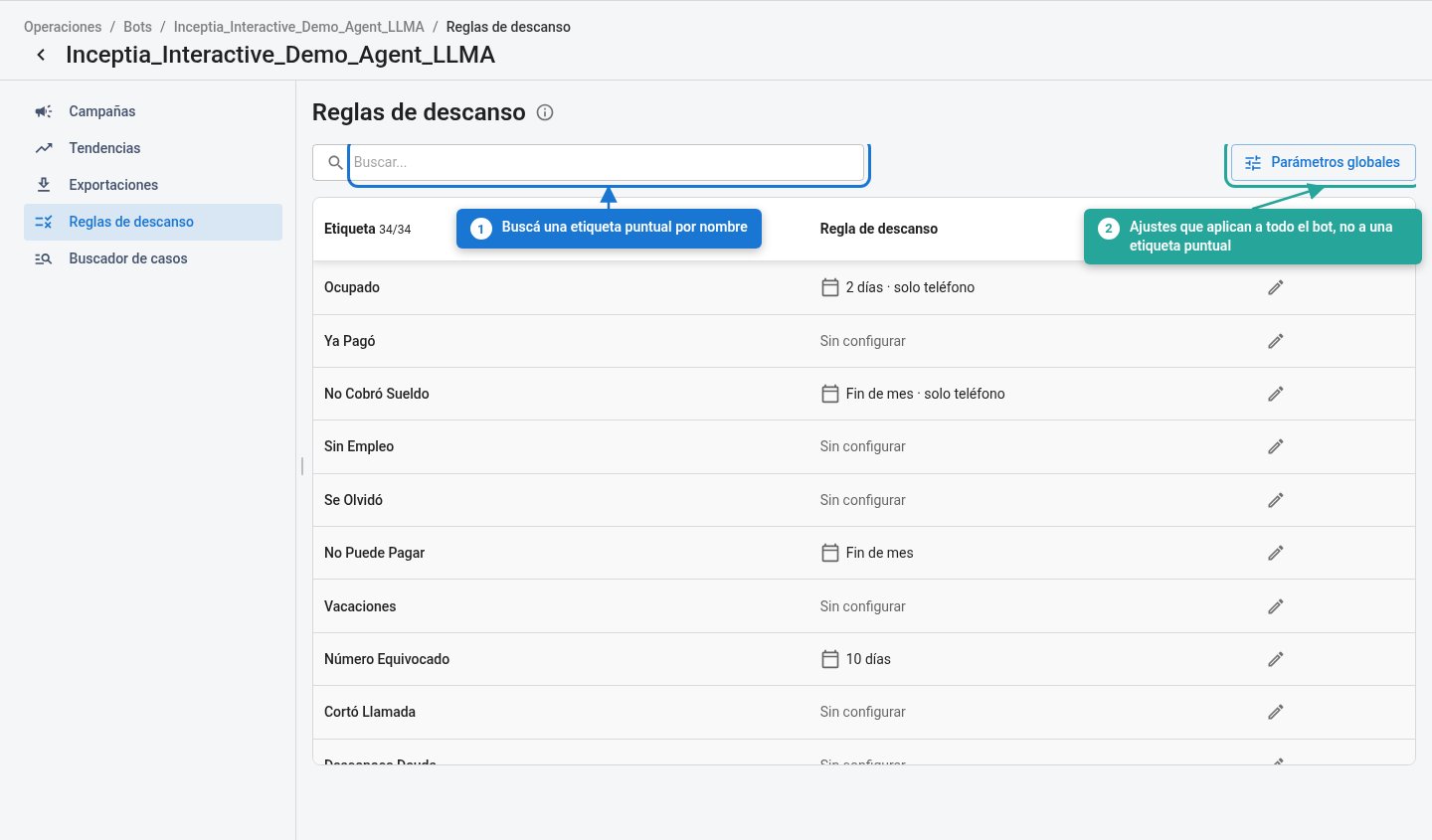 The table lists your bot's labels and, for each one, its rule:
| Column | Description |
| ------------- | --------------------------------------------------------------------------------------------------------------------- |
| **Label** | The outcome a call can end with. The counter in the header shows how many are being displayed out of the bot's total. |
| **Rest rule** | The rule's summary — "10 days", "60 days", "10 days · phone only" — or **Not configured**. |
| **Action** | Opens the rule panel for that row. |
**Not configured** means that label doesn't generate any rest: the case becomes available again as soon as the call ends.
The **search box** filters labels by name, useful when the bot has many. The **Global parameters** button opens the settings that apply to the whole bot rather than to a single label.
The labels the platform uses internally — delivery failures and the technical ones Calling, Undefined, Error and Recall — don't appear in the list: they aren't business outcomes, so they don't carry a rule.
***
## How to read a label's rule
The pencil icon on any row opens the rule panel. If the label already had a rule, the panel opens preloaded with that configuration.
The table lists your bot's labels and, for each one, its rule:
| Column | Description |
| ------------- | --------------------------------------------------------------------------------------------------------------------- |
| **Label** | The outcome a call can end with. The counter in the header shows how many are being displayed out of the bot's total. |
| **Rest rule** | The rule's summary — "10 days", "60 days", "10 days · phone only" — or **Not configured**. |
| **Action** | Opens the rule panel for that row. |
**Not configured** means that label doesn't generate any rest: the case becomes available again as soon as the call ends.
The **search box** filters labels by name, useful when the bot has many. The **Global parameters** button opens the settings that apply to the whole bot rather than to a single label.
The labels the platform uses internally — delivery failures and the technical ones Calling, Undefined, Error and Recall — don't appear in the list: they aren't business outcomes, so they don't carry a rule.
***
## How to read a label's rule
The pencil icon on any row opens the rule panel. If the label already had a rule, the panel opens preloaded with that configuration.
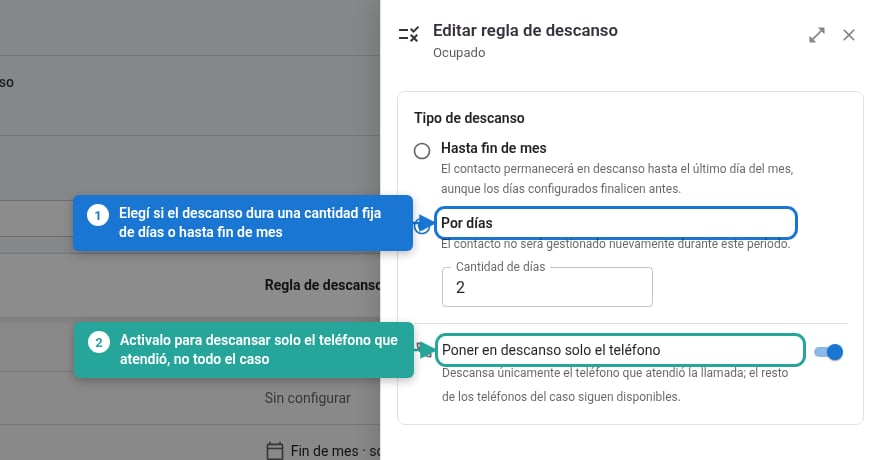 | Option | What it does |
| ------------------------------ | --------------------------------------------------------------------------------------------------------- |
| **Until the end of the month** | The case rests until the last day of the current month, even if the configured days end sooner. |
| **By days** | The case isn't managed again for the number of days set in **Number of days**. |
| **Rest only the phone number** | Only the phone number that answered that call rests; the rest of the case's phone numbers stay available. |
The rule takes effect once you confirm with **Save changes**.
***
## Deleting a rule
**Delete rule**, inside the same panel, removes the rule and leaves the label as **Not configured**. From that moment on, cases ending with that label become available again as soon as the call ends.
| Option | What it does |
| ------------------------------ | --------------------------------------------------------------------------------------------------------- |
| **Until the end of the month** | The case rests until the last day of the current month, even if the configured days end sooner. |
| **By days** | The case isn't managed again for the number of days set in **Number of days**. |
| **Rest only the phone number** | Only the phone number that answered that call rests; the rest of the case's phone numbers stay available. |
The rule takes effect once you confirm with **Save changes**.
***
## Deleting a rule
**Delete rule**, inside the same panel, removes the rule and leaves the label as **Not configured**. From that moment on, cases ending with that label become available again as soon as the call ends.
 ***
## The bot's global parameters
Unlike per-label rules, these two settings apply to the whole bot.
***
## The bot's global parameters
Unlike per-label rules, these two settings apply to the whole bot.
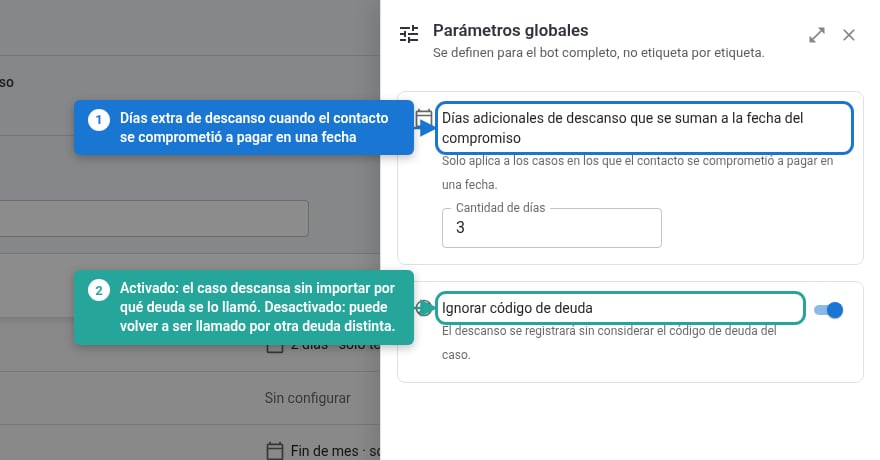 **Additional rest days on top of the promised date.** When a contact promises to pay on a given date, the case rests until that date. This parameter is the extra days added before reactivating it.
A `0` here does **not** mean "no rest for the promise". The case still rests until the day of the promise itself, with no buffer days: the promise rule always applies.
**Ignore debt code.** Defines whether the rest applies to the whole contact or only to the debt they were called about:
* **On**: the case rests regardless of which debt it was called about. It can't be contacted again for any debt while the rest lasts.
* **Off** (the default behavior): the rest is tied to that specific debt, so the case **can still be called for a different debt**.
Don't confuse this option with "phone only": one limits the rest by debt, the other by phone number. They're independent.
***
## When changes take effect
Any change to the rest rules applies immediately to the cases processed from that moment on, **including campaigns already running** with that bot — not just future ones. There's no versioning or effective date.
Cases that were already resting when the change was made keep the rest they had until it expires.
***
## Resting cases through the API
A campaign's detail includes the `q_resting_cases` field: the number of cases in that campaign that weren't managed because they were resting. It's the way to see the impact of these rules without entering the platform.
If a campaign calls far fewer cases than you uploaded, `q_resting_cases` is usually the explanation. See [Campaign detail](/en/api-reference/campaigns/detail).
**Additional rest days on top of the promised date.** When a contact promises to pay on a given date, the case rests until that date. This parameter is the extra days added before reactivating it.
A `0` here does **not** mean "no rest for the promise". The case still rests until the day of the promise itself, with no buffer days: the promise rule always applies.
**Ignore debt code.** Defines whether the rest applies to the whole contact or only to the debt they were called about:
* **On**: the case rests regardless of which debt it was called about. It can't be contacted again for any debt while the rest lasts.
* **Off** (the default behavior): the rest is tied to that specific debt, so the case **can still be called for a different debt**.
Don't confuse this option with "phone only": one limits the rest by debt, the other by phone number. They're independent.
***
## When changes take effect
Any change to the rest rules applies immediately to the cases processed from that moment on, **including campaigns already running** with that bot — not just future ones. There's no versioning or effective date.
Cases that were already resting when the change was made keep the rest they had until it expires.
***
## Resting cases through the API
A campaign's detail includes the `q_resting_cases` field: the number of cases in that campaign that weren't managed because they were resting. It's the way to see the impact of these rules without entering the platform.
If a campaign calls far fewer cases than you uploaded, `q_resting_cases` is usually the explanation. See [Campaign detail](/en/api-reference/campaigns/detail).