> ## Documentation Index
> Fetch the complete documentation index at: https://docs.inceptia.ai/llms.txt
> Use this file to discover all available pages before exploring further.
# Bot Parameters
> Case configuration: contact identification, grouping, name, product, and additional fields.
The **Bot Parameters** tab of **Campaign Input** defines what data from the input file is sent to the bot and how cases are organized.
***
## General parameters
Case configuration: grouping, name, code, and product parameters.
### Case ID
The file's column that uniquely identifies each contact in the campaign.
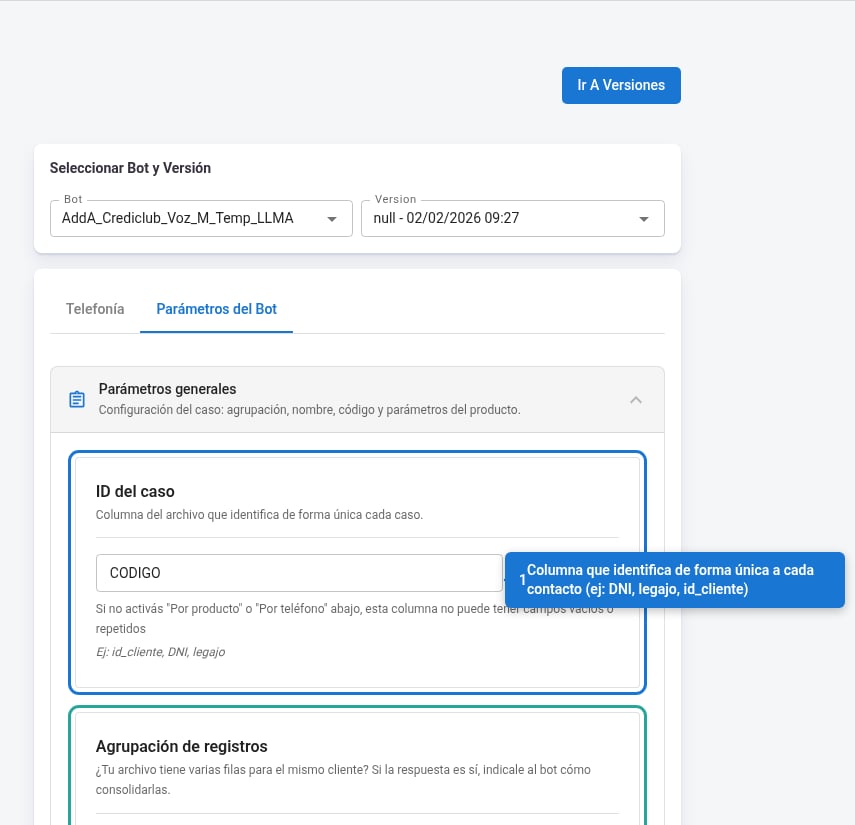 * Type the exact column name as it appears in your file (e.g. `DNI`, `legajo`, `id_cliente`).
* This column **can't have empty or repeated values**, except when one of the grouping options described below is enabled.
* With the **Actions** button you can apply transformations to this column's values before processing them.
### Record grouping
Enable this if your file has several rows for the same contact and you need to consolidate them into a single case.
| Option | When to enable it |
| -------------- | ------------------------------------------------------------------------------------------------------------------------------ |
| **By product** | The same contact appears in several rows with different products. E.g.: `customer A — mortgage` / `customer A — personal loan` |
| **By phone** | The same contact appears in several rows with different phone numbers |
You can enable both options at the same time.
***
### First and last name handling
Configure which columns in your file contain the contact's first and last name and how they're organized.
* Type the exact column name as it appears in your file (e.g. `DNI`, `legajo`, `id_cliente`).
* This column **can't have empty or repeated values**, except when one of the grouping options described below is enabled.
* With the **Actions** button you can apply transformations to this column's values before processing them.
### Record grouping
Enable this if your file has several rows for the same contact and you need to consolidate them into a single case.
| Option | When to enable it |
| -------------- | ------------------------------------------------------------------------------------------------------------------------------ |
| **By product** | The same contact appears in several rows with different products. E.g.: `customer A — mortgage` / `customer A — personal loan` |
| **By phone** | The same contact appears in several rows with different phone numbers |
You can enable both options at the same time.
***
### First and last name handling
Configure which columns in your file contain the contact's first and last name and how they're organized.
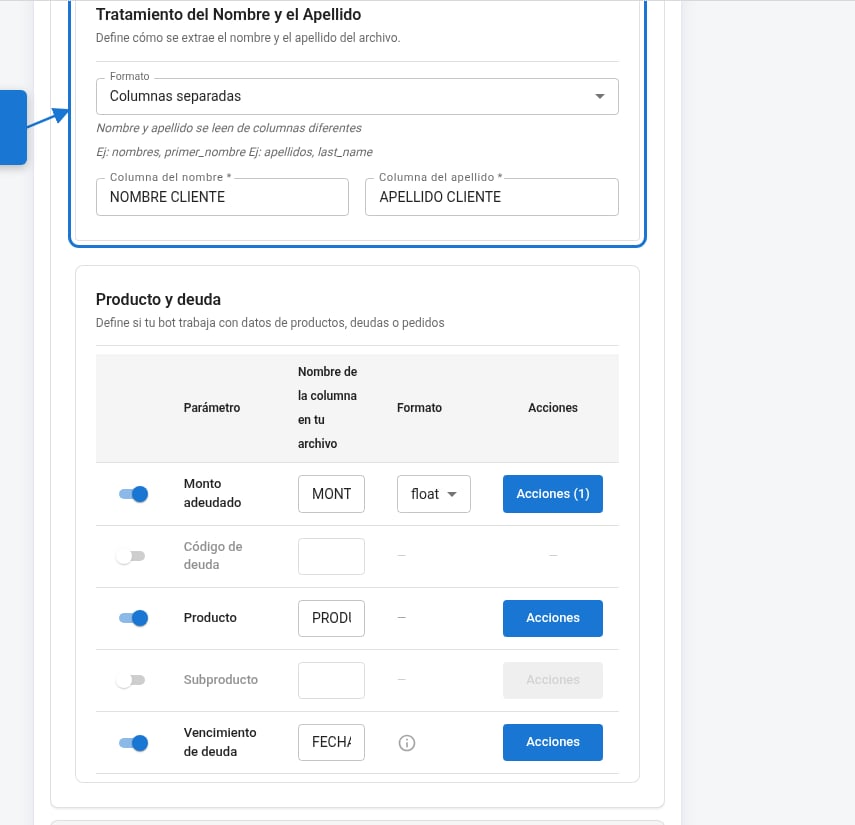 **Format**: defines how the name comes in the file.
| Option | Description |
| -------------------------------------- | ----------------------------------------------------------------------- |
| Separate columns | First and last name in different columns |
| Single column: last name first | The first word is taken as last name, the rest as first name |
| Single column: first name first | The first words are taken as first name, the last one as last name |
| Single column: everything as last name | Everything in this column is taken as last name. First name stays empty |
Once you've chosen the format, fill in **First name column** and **Last name column** with the exact names of the columns in your file.
***
### Product and debt
Map the debt and product parameters to the corresponding columns in your file. Only enable the ones your campaign uses.
**Format**: defines how the name comes in the file.
| Option | Description |
| -------------------------------------- | ----------------------------------------------------------------------- |
| Separate columns | First and last name in different columns |
| Single column: last name first | The first word is taken as last name, the rest as first name |
| Single column: first name first | The first words are taken as first name, the last one as last name |
| Single column: everything as last name | Everything in this column is taken as last name. First name stays empty |
Once you've chosen the format, fill in **First name column** and **Last name column** with the exact names of the columns in your file.
***
### Product and debt
Map the debt and product parameters to the corresponding columns in your file. Only enable the ones your campaign uses.
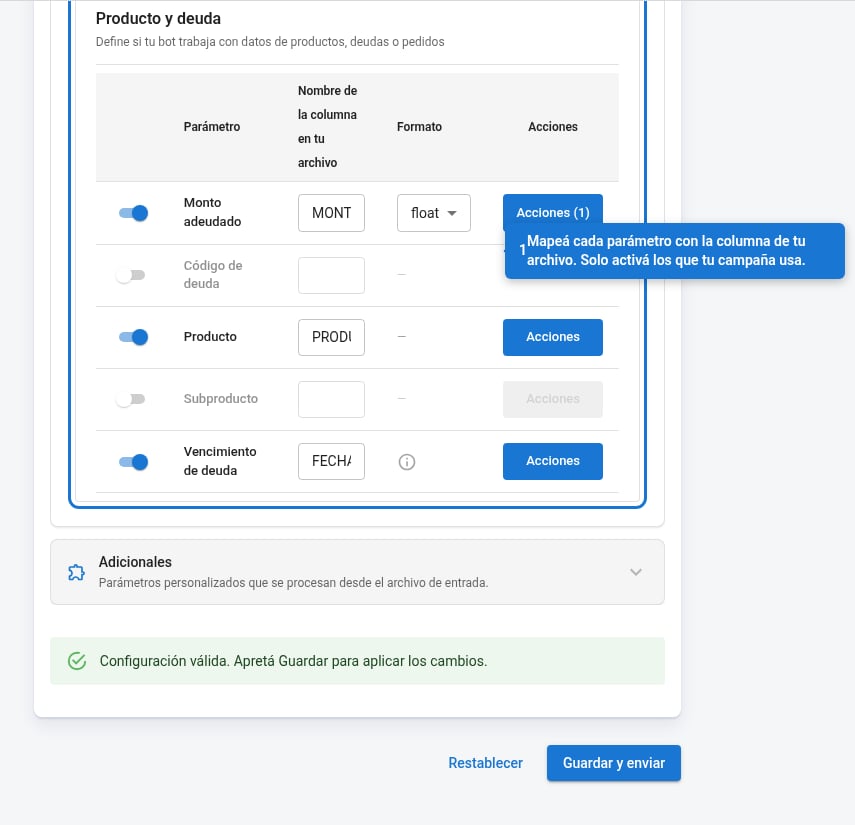 | Parameter | Type | Description |
| ------------- | ---------------- | ----------------------------------------------------------------------------------- |
| Amount owed | `int` or `float` | The contact's debt amount |
| Debt code | `str` | Specific identifier for the debt |
| Product | `str` | Product name or identifier |
| Subproduct | `str` | Optional subdivision of the product |
| Debt due date | `date` | Due date. Supported formats: `DD/MM/YYYY`, `YYYY-MM-DD`, `DD-MM-YYYY`, `YYYY/MM/DD` |
With the **Actions** button on each parameter you can apply additional transformations or filters to the values before sending them to the bot.
***
## Additional fields
Extra fields from the file that the bot can receive as custom parameters. Optional.
| Parameter | Type | Description |
| ------------- | ---------------- | ----------------------------------------------------------------------------------- |
| Amount owed | `int` or `float` | The contact's debt amount |
| Debt code | `str` | Specific identifier for the debt |
| Product | `str` | Product name or identifier |
| Subproduct | `str` | Optional subdivision of the product |
| Debt due date | `date` | Due date. Supported formats: `DD/MM/YYYY`, `YYYY-MM-DD`, `DD-MM-YYYY`, `YYYY/MM/DD` |
With the **Actions** button on each parameter you can apply additional transformations or filters to the values before sending them to the bot.
***
## Additional fields
Extra fields from the file that the bot can receive as custom parameters. Optional.
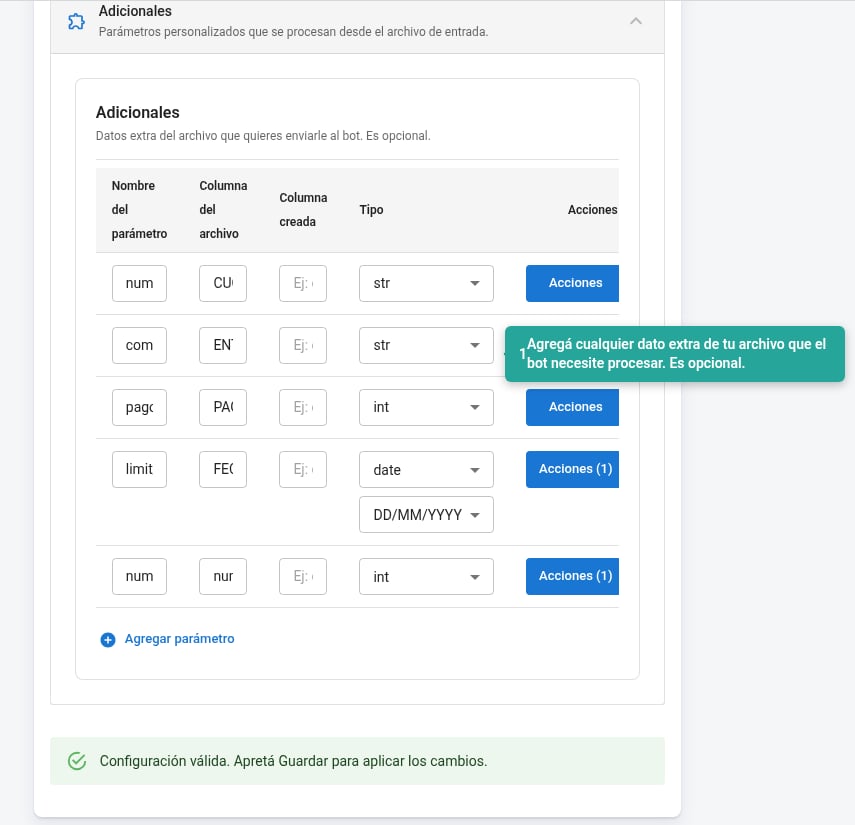 For each additional field you configure:
| Field | Description |
| ------------------ | -------------------------------------------------------------------------------------------------- |
| **Parameter name** | Internal name the bot will use to refer to this data |
| **File column** | Exact name of the column in your input file |
| **Created column** | (Optional) If the value is generated from a transformation and doesn't come directly from the file |
| **Type** | Data type: `str`, `int`, `float`, or `date` |
With **Actions** you can apply transformations to the value of each additional field.
Use **+ Add parameter** to add new fields.
For each additional field you configure:
| Field | Description |
| ------------------ | -------------------------------------------------------------------------------------------------- |
| **Parameter name** | Internal name the bot will use to refer to this data |
| **File column** | Exact name of the column in your input file |
| **Created column** | (Optional) If the value is generated from a transformation and doesn't come directly from the file |
| **Type** | Data type: `str`, `int`, `float`, or `date` |
With **Actions** you can apply transformations to the value of each additional field.
Use **+ Add parameter** to add new fields.