> ## Documentation Index
> Fetch the complete documentation index at: https://docs.inceptia.ai/llms.txt
> Use this file to discover all available pages before exploring further.
# Telephony
> Phone number configuration: file columns, normalization, and validations.
The **Telephony** tab of **Campaign Input** covers everything related to how the bot reads, cleans, and validates the phone numbers in your file before dialing.
***
## Phone configuration
Before adding columns, configure the two global selectors. They define how the area code and phone type are interpreted for **all** the columns you add.
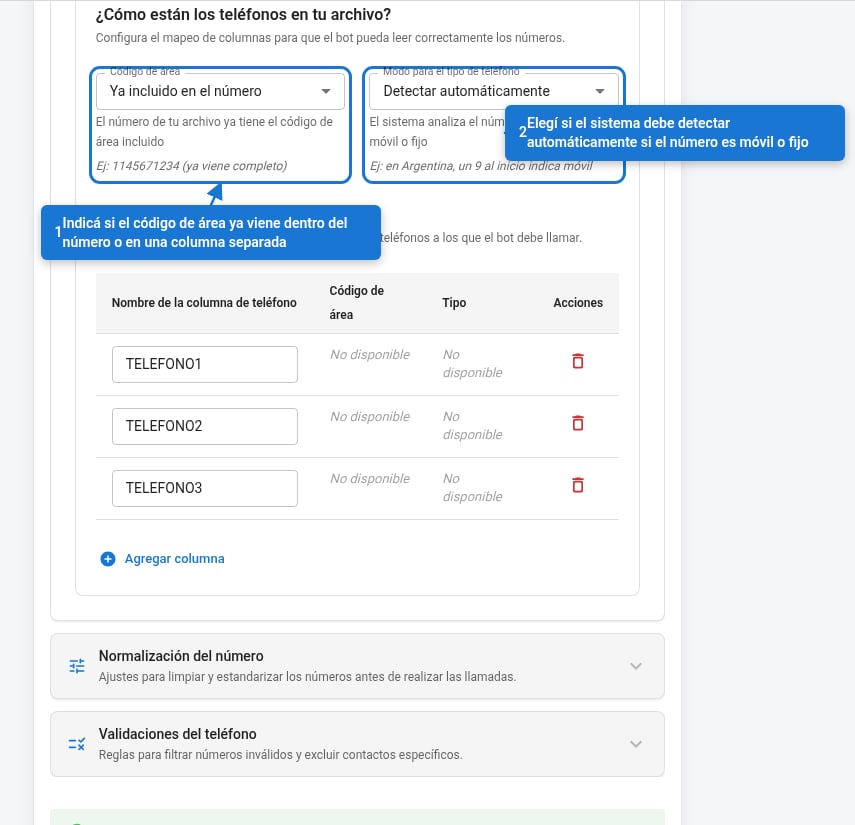 ### Area code
Defines whether the area code is already included in the number or comes in a separate column in the file.
| Option | When to use it | Enables «Area code» column |
| -------------------------------- | ----------------------------------------------------------------------------------------------------------- | -------------------------- |
| Already included in the number | The complete number already comes in a single column. The most common option. | — |
| Add 11 at the start | The numbers don't have an area code and the bot operates in Buenos Aires. The system adds 11 automatically. | — |
| In a separate column | The area code comes in a different column from the number. | ✓ |
| Separate column (or 11 if empty) | Same as above, but when the area code cell is empty it uses 11 as the default value. | ✓ |
The "Add 11" options are a shortcut for Buenos Aires (prefix 11). For campaigns with contacts from other provinces, use **In a separate column** and map the corresponding column in the table.
### Phone type mode
Classifies numbers as mobile or landline. In Argentina, mobile phones require the system to insert a `9` between the country code and the area code.
| Option | Behavior |
| -------------------- | --------------------------------------------------------------------------------------------------------------------------------------- |
| Auto-detect | The system infers whether each number is mobile or landline by analyzing its format. |
| Set a fixed type | You manually set the phone type for each column in the table. |
| In a separate column | Your file has a column indicating whether each phone is mobile or landline. Enables the **Type** field in each row of the column table. |
**When you choose "Set a fixed type"**, a selector appears in each row of the table:
| Value | Description |
| ----------------------------------- | ------------------------------------------------------------------------------ |
| Mobile phone | All numbers in that column are treated as mobile phones |
| Landline phone | All are treated as landlines |
| Generate two phones. Mobile first | For each number, two attempts are generated: first as mobile, then as landline |
| Generate two phones. Landline first | Same, but landline first |
| Infer prefix based on 15 | The system detects mobiles by the presence of 15 in the number |
**When you choose "In a separate column"**, the **Value that identifies mobile** field appears: enter the exact text your file uses for mobile phones (e.g. `CEL`, `móvil`, `M`). Any other value is treated as landline.
The **Type** field that appears in each table row has to match exactly the name of the column in your file that indicates whether the number is mobile or landline (e.g. `tipo_tel`, `modalidad`). The same name is used for all rows.
**Argentina**: mobile phones require the digit 9 between the country code and the area code (e.g. 54**9**11...). The system adds that 9 automatically when it identifies a number as mobile. If all your contacts have mobile phones, choose **Set a fixed type → Mobile phone** to make sure.
### Columns with phone numbers
Add one row for each column in your file that contains phone numbers. The bot processes them in the order of the table.
### Area code
Defines whether the area code is already included in the number or comes in a separate column in the file.
| Option | When to use it | Enables «Area code» column |
| -------------------------------- | ----------------------------------------------------------------------------------------------------------- | -------------------------- |
| Already included in the number | The complete number already comes in a single column. The most common option. | — |
| Add 11 at the start | The numbers don't have an area code and the bot operates in Buenos Aires. The system adds 11 automatically. | — |
| In a separate column | The area code comes in a different column from the number. | ✓ |
| Separate column (or 11 if empty) | Same as above, but when the area code cell is empty it uses 11 as the default value. | ✓ |
The "Add 11" options are a shortcut for Buenos Aires (prefix 11). For campaigns with contacts from other provinces, use **In a separate column** and map the corresponding column in the table.
### Phone type mode
Classifies numbers as mobile or landline. In Argentina, mobile phones require the system to insert a `9` between the country code and the area code.
| Option | Behavior |
| -------------------- | --------------------------------------------------------------------------------------------------------------------------------------- |
| Auto-detect | The system infers whether each number is mobile or landline by analyzing its format. |
| Set a fixed type | You manually set the phone type for each column in the table. |
| In a separate column | Your file has a column indicating whether each phone is mobile or landline. Enables the **Type** field in each row of the column table. |
**When you choose "Set a fixed type"**, a selector appears in each row of the table:
| Value | Description |
| ----------------------------------- | ------------------------------------------------------------------------------ |
| Mobile phone | All numbers in that column are treated as mobile phones |
| Landline phone | All are treated as landlines |
| Generate two phones. Mobile first | For each number, two attempts are generated: first as mobile, then as landline |
| Generate two phones. Landline first | Same, but landline first |
| Infer prefix based on 15 | The system detects mobiles by the presence of 15 in the number |
**When you choose "In a separate column"**, the **Value that identifies mobile** field appears: enter the exact text your file uses for mobile phones (e.g. `CEL`, `móvil`, `M`). Any other value is treated as landline.
The **Type** field that appears in each table row has to match exactly the name of the column in your file that indicates whether the number is mobile or landline (e.g. `tipo_tel`, `modalidad`). The same name is used for all rows.
**Argentina**: mobile phones require the digit 9 between the country code and the area code (e.g. 54**9**11...). The system adds that 9 automatically when it identifies a number as mobile. If all your contacts have mobile phones, choose **Set a fixed type → Mobile phone** to make sure.
### Columns with phone numbers
Add one row for each column in your file that contains phone numbers. The bot processes them in the order of the table.
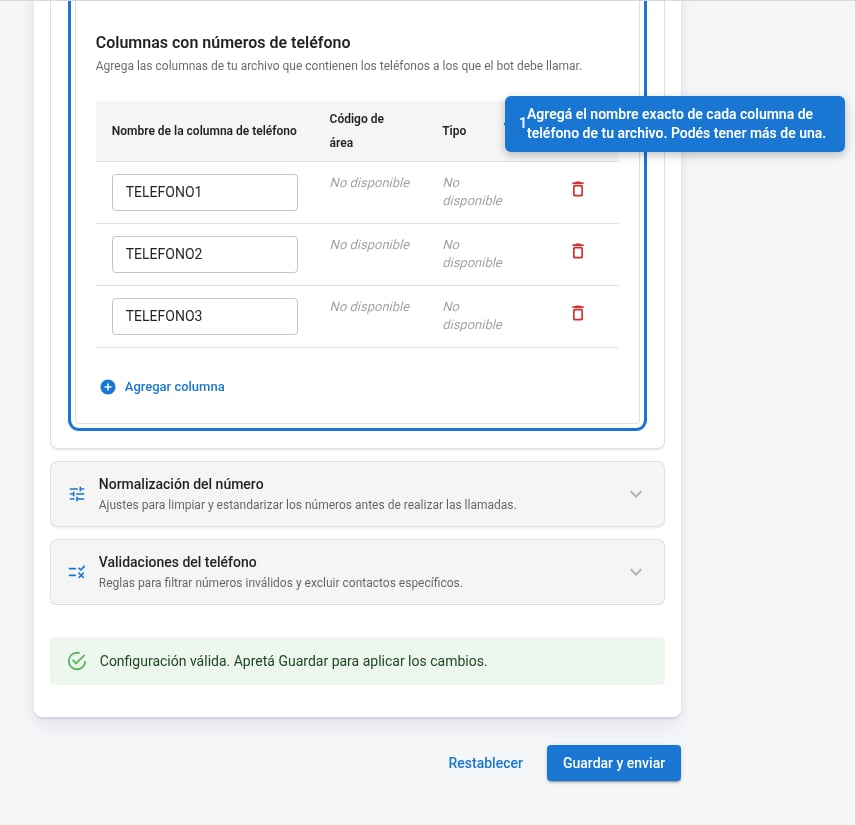 The **Phone column name** field has to match exactly your file's header. If your file has 5 phone columns (e.g. Tel\_1, Tel\_2... Tel\_5), add 5 rows.
***
## Number normalization
The three rules clean up the number before dialing it. **They apply in order**: each one acts on the result of the previous one.
The **Phone column name** field has to match exactly your file's header. If your file has 5 phone columns (e.g. Tel\_1, Tel\_2... Tel\_5), add 5 rows.
***
## Number normalization
The three rules clean up the number before dialing it. **They apply in order**: each one acts on the result of the previous one.
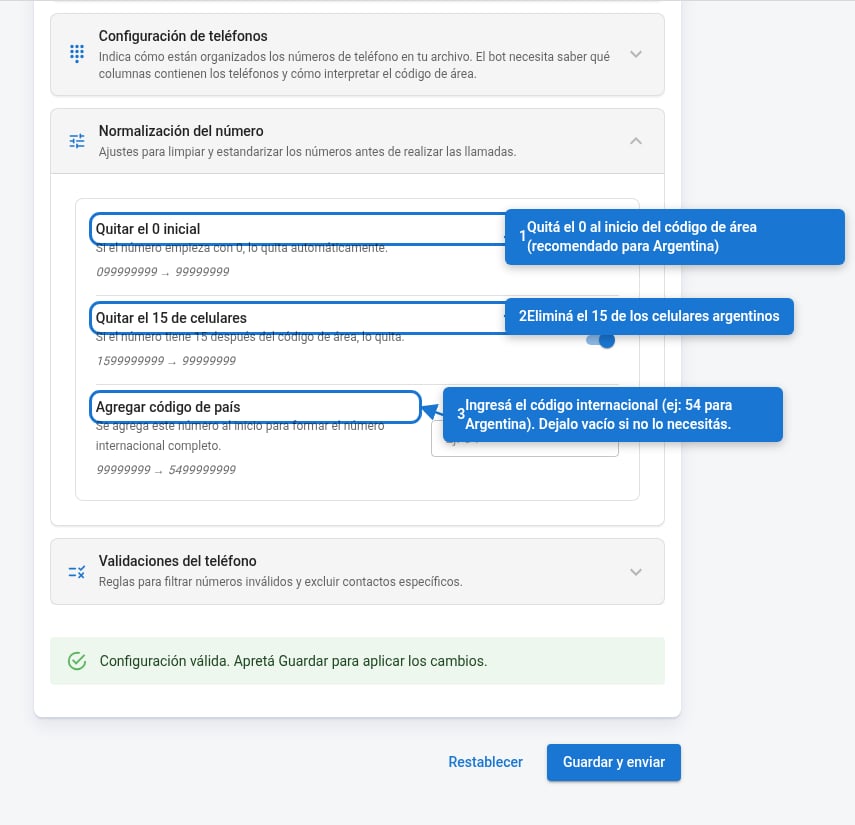 | Rule | What it does | Example |
| ------------------------------ | -------------------------------------------------------------- | ------------------------- |
| **Remove the leading 0** | Removes the 0 at the start of the area code | `099123456` → `99123456` |
| **Remove the 15 from mobiles** | Removes the 15 after the area code in Argentine mobile numbers | `1599123456` → `99123456` |
| **Add country code** | Prepends the international code to the number | `99123456` → `5499123456` |
For Argentina, enable all three rules and set `54` as the country code. For bots outside Argentina: disable "Remove the 0" and "Remove the 15," and use the corresponding code (e.g. `55` for Brazil).
***
## Phone validations
Rules to filter out invalid or unwanted numbers before sending them to the bot.
| Rule | What it does | Example |
| ------------------------------ | -------------------------------------------------------------- | ------------------------- |
| **Remove the leading 0** | Removes the 0 at the start of the area code | `099123456` → `99123456` |
| **Remove the 15 from mobiles** | Removes the 15 after the area code in Argentine mobile numbers | `1599123456` → `99123456` |
| **Add country code** | Prepends the international code to the number | `99123456` → `5499123456` |
For Argentina, enable all three rules and set `54` as the country code. For bots outside Argentina: disable "Remove the 0" and "Remove the 15," and use the corresponding code (e.g. `55` for Brazil).
***
## Phone validations
Rules to filter out invalid or unwanted numbers before sending them to the bot.
 ### Digit count
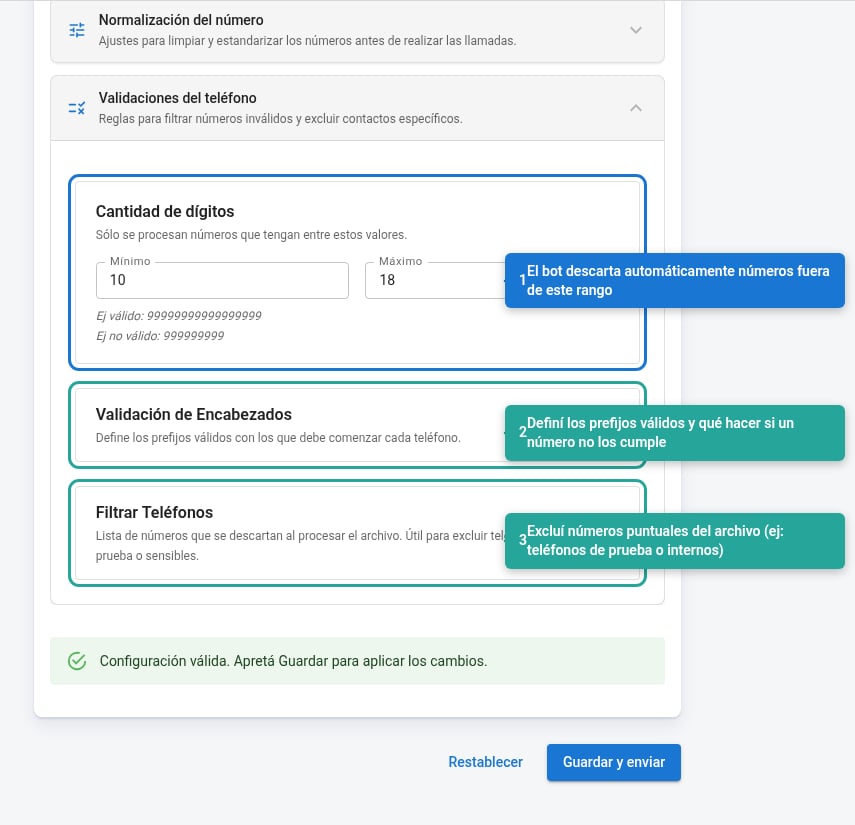
Defines the valid length range for the number **once built** (with normalization already applied). Numbers outside the range are silently discarded.
**Argentina**: a complete mobile number with country code has between 12 and 13 digits (e.g. `5491112345678`). Landlines have between 10 and 11.
### Header validation *(optional)*
Checks that the number starts with the expected prefixes. When a number doesn't comply, you choose what to do:
| Action | When to use it |
| -------------------------- | ------------------------------------------------------------------------------------------ |
| **Add number** | The prefix is missing but the number is recoverable. The system prepends it automatically. |
| **Ignore number** | Discard it silently. The case still exists with its other phone numbers. |
| **Stop campaign creation** | Invalid numbers indicate an error in the file. Block creation until the issue is resolved. |
### Filter phone numbers *(optional)*
A list of specific numbers excluded from processing. Useful for test, internal, or sensitive phone numbers that might appear in the client's file.
### Digit count
Defines the valid length range for the number **once built** (with normalization already applied). Numbers outside the range are silently discarded.
**Argentina**: a complete mobile number with country code has between 12 and 13 digits (e.g. `5491112345678`). Landlines have between 10 and 11.
### Header validation *(optional)*
Checks that the number starts with the expected prefixes. When a number doesn't comply, you choose what to do:
| Action | When to use it |
| -------------------------- | ------------------------------------------------------------------------------------------ |
| **Add number** | The prefix is missing but the number is recoverable. The system prepends it automatically. |
| **Ignore number** | Discard it silently. The case still exists with its other phone numbers. |
| **Stop campaign creation** | Invalid numbers indicate an error in the file. Block creation until the issue is resolved. |
### Filter phone numbers *(optional)*
A list of specific numbers excluded from processing. Useful for test, internal, or sensitive phone numbers that might appear in the client's file.