

Where to find them
There are two ways to reach a campaign, depending on what you need:- Campaign monitoring shows the campaigns of all your bots in a single table. It’s the view to use when you want to know how the day is going.
- Bots → a bot → Campaigns shows only that bot’s campaigns.
The table doesn’t update on its own in real time: it refreshes every 60 seconds, and you can also force it with the refresh button.
Campaign statuses
Start, pause and finish
From each campaign’s actions menu you can change its status without opening the detail:A campaign also closes on its own, without anyone finishing it, when it reaches 100% completion. If you see a Closed campaign that nobody closed, this is why.
A campaign’s metrics
The detail groups its figures into two blocks: Metrics, with contactability and success rate, and Progress, with the two progress bars.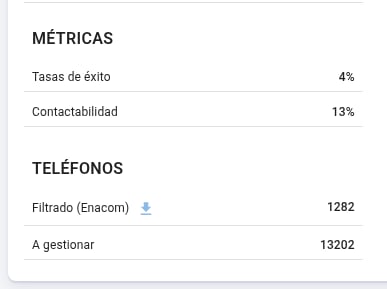
Contactability
The percentage of the campaign’s cases the bot managed to talk to. A case counts toward contactability when there was a conversation; a phone that rang with nobody picking up doesn’t.On ongoing campaigns the value updates continuously, with up to a minute of delay. On closed campaigns the final value stays fixed.
Success rate
The percentage of the campaign’s cases that ended in a payment promise. It’s the business-outcome metric: it doesn’t measure how many calls went well, but how many cases committed to pay.Contactability and success rate answer different questions and aren’t comparable to each other: one measures reach — how many you talked to — and the other, outcome. It’s normal for one to be high and the other low.
The two progress bars
Under Progress there are two bars measuring two different things about the same batch: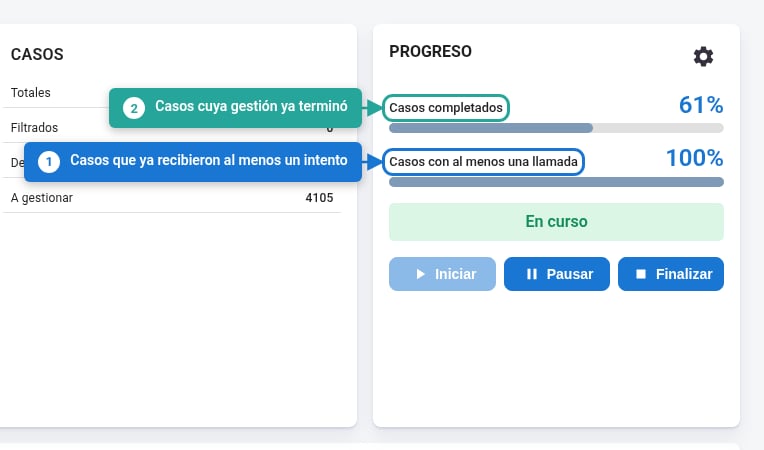
If the calls bar hits 100% and the completed one lags behind for a while, that’s expected: there are no cases left to attempt, but some still allow another retry before closing.
A campaign’s parameters
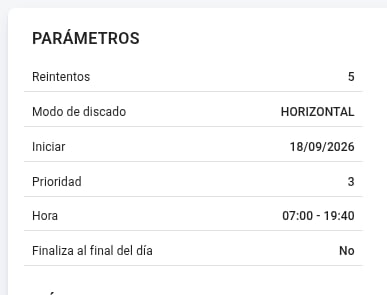
Retries
What it is: how many times each phone number is called before it’s considered exhausted.Dial mode and Priority
These two go together: the mode defines how the campaign goes through each case’s phone numbers, and priority defines which ones. Each case can bring several phone numbers. The order isn’t arbitrary: they’re the columns you defined in the campaign input file, and that order is the priority order — the first one is the main number.Horizontal
The campaign goes through several numbers per case. Priority says up to which one: with
3, it uses the first three and leaves the rest out.Vertical
The campaign works on a single number. Priority says which one: with
2, it only calls each case’s second phone number.Priority is not a priority of one campaign over another: it doesn’t define which one is handled first if you have several running, but which of each case’s phone numbers come into play.
Start and schedule
The start date defines when it begins, and the schedule between which hours of the day it can call, in the bot’s time zone.The campaign’s cases
The Cases block reports what happened with the file’s cases:
The download icon next to Discarded due to rest gives you the list of those cases, one row each: the identifier, its phone numbers, the debt codes, the reason for the rest —the label that caused it— and the activation date, that is, from when it’s available to be handled again.
The campaign’s phone numbers
The Phone numbers block does the same one level down, since a case can bring several numbers:This filter only applies where there’s a regulator with a public registry — in Argentina, Enacom. It avoids spending attempts on numbers that were never going to answer.